Bilanzo is AI-assisted accounting software for Swiss SMEs and sole proprietors. It reads, categorises and posts your receipts, prepares VAT returns and gets your annual accounts ready.
Bilanzo runs locally on your own computer. Your receipts, bookings and client data stay there. The only things that leave your machine are the licence check, the update query, the official daily exchange rates and the integrations you connect yourself.
Who is Bilanzo for?
FAQ
Bilanzo is aimed at:
self-employed people and sole proprietors
SMEs with up to roughly 50 employees
fiduciary offices looking after several clients
startups looking for affordable bookkeeping
Bilanzo is not designed for large groups with complex consolidation requirements.
What can I do during the trial?
FAQ
The trial covers 100 receipts. After the 100 receipts Bilanzo gives you 10 bank reconciliations as a bonus, so that you can run the whole flow from receipt to bank reconciliation once. There is no time limit.
Receipt processing is fully available during the trial: AI categorisation, VAT calculation and PDF export. Only once the limits are used up does the account switch to "Expired" and you take out a subscription.
Training the model with your own corrections earns additional bonus receipts.
How do I get started after registering?
Guide
After registering you receive a confirmation e-mail. Then:
Download Bilanzo Local from /download (setup or web installer)
Install it; at the end the browser opens http://localhost:3100 by itself
Enter the setup code: Bilanzo writes it on this computer at start-up (file setup_code.json in the data folder). Whoever knows the code is sitting at the machine, which is why the first administrator needs no confirmation e-mail
Set e-mail and password and sign in
Activate the licence (once, as administrator, with your licence key)
Create your first company profile (company name, UID, VAT number)
Upload a first receipt and check the AI categorisation
At first start Bilanzo needs internet access for the licence check; with the first confirmed check the AI model is unlocked and unpacked, which takes a few minutes. You can skip bexio in the assistant and connect it later.
Which address do I open in the browser after installation?
Guide
On the computer the launcher opens the browser for you. If the window stays empty, type http://localhost:3100 by hand.
Stay on that address. The sign-in is bound to the origin: if you open the same installation under another name or via the IP address, the session cookie is not valid there and the sign-in fails.
Port 3100 is fixed, as is port 8101 for the bexio callback. If another program occupies one of them, Bilanzo does not start but names that program in the message "Port in use". Close that program and start Bilanzo again.
Is there a mobile app?
FAQ
There is no separate app for iOS or Android. Bilanzo Local runs on your Windows computer and is used in the browser.
Photos from your phone are uploaded like any other file, including HEIC from iPhones. Direct pairing of the phone with your installation (capture page on the same network) is in preparation; as soon as it is released, the guide will be here.
On bilanzo.ch you manage your customer account, your subscription and your downloads.
Download the installer from /download: Setup (offline package, several parts) or web installer (small file, fetches the rest)
Start the setup; Windows asks for administrator rights. If SmartScreen shows a warning, choose "More info" and "Run anyway"
Confirm the program folder. Default: C:\Program Files\Mediaquotes\Bilanzo Local. The assistant checks the free space on the drive
The first set-up runs in a visible window (3 to 5 minutes): unpack program and AI model, create database and queue as Windows services (BilanzoPostgres, BilanzoRedis), set up autostart and the tray icon
At the end the browser opens http://localhost:3100 with the setup code
Bilanzo requires Windows 10 from version 1809 or Windows 11, 64-bit, and an NVIDIA graphics card with a current driver. No additional software or virtualisation is needed. Leave the set-up window open while it works.
How long does installation take?
FAQ
Expect about ten minutes of work at the screen. You need no command line and no prior knowledge.
Check of the computer and disk space: under a minute
First set-up (unpacking, creating the services, preparing the database): 3 to 5 minutes
With the web installer additionally the download of the package: depending on your connection
After licence activation the unpacking of the AI model (4.37 GB): a few minutes, in the background
The package is several gigabytes. On a slow line the download takes correspondingly longer; we deliberately give no fixed figure. Leave the window open during this time.
How do I install Bilanzo on macOS?
Guide
A macOS build is in progress. There is no download for it yet.
Bilanzo Local currently runs on Windows 10 (build 1809 or newer) and Windows 11, 64-bit in each case.
How do I set up my company profile?
Guide
On first launch you fill in the company profile:
Company name: as in the commercial register
UID: CHE-xxx.xxx.xxx (optional for sole proprietors without a register entry)
VAT number: the UID plus the VAT suffix
VAT accounting method: effective or net tax rate / flat rate
Financial year: start and end (default: 1 January to 31 December)
Do I need bexio to use Bilanzo?
FAQ
Yes. Bilanzo is built to work with a bexio ledger. Chart of accounts, contacts, tax codes and the journal come from there, and the prepared posting goes back there. bexio stays the leading ledger; Bilanzo is the layer in front of it that reads, categorises and prepares.
The set-up assistant technically lets you skip the bexio step. That is a sequence, not a release: the credentials for the bexio sign-in only become available after licence activation, which is why you can finish the installation first. Complete the connection afterwards.
Without a connected bexio you are missing the bexio AI analysis, the handover of prepared postings and the import of your chart of accounts.
How do I connect Bilanzo to bexio, and where do the credentials come from?
Guide
You do not need to type in a key. The connection runs through your sign-in at bexio.
Open the bexio step in the set-up assistant. Later you find it under Settings > Integrations
Click Connect with bexio
The bexio sign-in page opens. Sign in there with your own bexio account
bexio shows you which rights Bilanzo requests. You confirm
bexio leads back to Bilanzo and the step shows bexio connected
These are the rights Bilanzo requests: sign-in, company profile, read contacts, read payable invoices, read receivable invoices, journal with chart of accounts and tax codes, read bank accounts, receipt files, and a renewal right so the connection stays alive.
These are the rights Bilanzo explicitly does not request: reading or triggering payment instructions, and writing receivable invoices.
The journal right is technically a write right at bexio, because bexio offers no read-only right for it.
The button only works once your licence is activated. If an error appears instead of the bexio sign-in page, the licence is usually not confirmed yet; see "I get the message licence expired".
Which other services can I connect, and how do I get the credentials?
Guide
What is not listed here does not exist.
bexio Pay (Amnis), connected. In the Professional subscription, and only if bexio Pay is active for you.
Open Settings > bexio Pay (Amnis), or the step in the set-up assistant
Click Connect with Amnis
Enter API key and API secret. You create both in your Amnis portal; Amnis describes where
Bilanzo checks the entries immediately against the real interface. If they are wrong, the entry is discarded and you get a message, instead of a connection that quietly fails later
GetMyInvoices, in preparation. The interface is built, the measurement against a real account is missing. See "What is GetMyInvoices and which plan includes it?".
EPost, in preparation. SIX bLink for bank connections, planned. Neither is connected today.
Your credentials for these services stay in your installation.
Can I manage several companies?
FAQ
Yes. Bilanzo runs several clients side by side. The Standard plan covers one client. On the Professional plan the number of clients is unlimited: the first is included, each further client costs CHF 50 per month.
Every client has its own receipts, accounts, VAT returns and reports. The separation sits at database level: no client sees another one’s data.
How do I connect Bilanzo to my bank?
Guide
There is no direct open banking connection. The route runs through files from your e-banking:
Read statements as CAMT.053, MT940 or bank CSV under Bank import
Produce a payment instruction as PAIN.001. This exists today for payroll payments out of the payroll module; you download the file and release it in your e-banking
PostFinance, UBS, Raiffeisen, ZKB and most Swiss cantonal banks provide CAMT.053 in their e-banking.
Maximum file size: 10 MB per receipt; larger files are rejected with a message. Recommendation: scan at 200 dpi or better for the best OCR results.
How do I upload a receipt?
Guide
There are several ways:
Drag and drop: pull the file straight into the receipts window
The "Add" button: pick the file from the file dialog
Phone: upload the photo from the phone like any file, HEIC included
After upload the AI processes the receipt and places it in the review queue.
How do I correct a wrong categorisation?
FAQ
Click the receipt in question and edit these fields:
account (Swiss SME chart of accounts)
VAT rate
date and amount (where recognition got it wrong)
description / purpose
Your corrections are learned locally and improve the suggestions for future receipts from the same supplier.
Can I delete a receipt afterwards?
FAQ
Yes, as long as the corresponding period is not yet closed. Closed periods are write-protected.
Deleted receipts are gone for good. Create a backup under Settings > Backup before deleting.
How do I handle a receipt with several items, such as a till slip?
FAQ
Bilanzo recognises multi-line receipts. You can assign each item to a different account ("split"). The AI proposes an account per line; you confirm or correct it.
What happens with receipts in foreign currency?
FAQ
Bilanzo automatically fetches the official daily VAT exchange rates of the Federal Tax Administration (ESTV), falling back on the rates of the Federal Office for Customs and Border Security (BAZG). For foreign-currency receipts the CHF equivalent is calculated and shown on the posting record. The booking currency is always CHF.
Bookkeeping & VAT
Chart of accounts, VAT returns and annual accounts.
Older rates (before 2024: 7.7% / 3.7% / 2.5%) remain available for historical entries.
How do I prepare a VAT return?
FAQ
Under VAT > Create return:
Choose the period (quarterly or half-yearly)
Bilanzo fills the boxes of the return form from the period’s entries
Check the return box by box and export it as PDF
Mark the return as "submitted" (this locks the period)
Bilanzo uses the method stored in the company profile: effective or net tax rate. For the net tax rate method you enter the rate approved by the FTA in the profile; without it no return is calculated. Check the return before you submit it. Responsibility for the figures submitted lies with you or your fiduciary; Bilanzo prepares, it does not sign.
What is the difference between agreed and collected consideration?
FAQ
Agreed consideration (default): VAT falls due when the invoice is issued, regardless of payment.
Collected consideration: VAT falls due only when payment arrives. Under art. 39 VAT Act the law provides for accounting on agreed consideration; the ESTV authorises accounting on collected consideration on request. There is no turnover threshold for it. The chosen method must be kept for at least one tax period.
Bilanzo currently accounts on agreed consideration.
How do I prepare the annual accounts?
FAQ
Under Annual accounts > New closing:
Post all outstanding receipts
Run the reconciliations (bank, payables, receivables)
Bilanzo checks for common errors
Export the reports: balance sheet, income statement, notes
Lock the period as closed
Can Bilanzo guarantee bookkeeping compliant with the Swiss Code of Obligations?
FAQ
Bilanzo is built around the requirements of art. 957 to 962 of the Swiss Code of Obligations and enforces:
double-entry bookkeeping (debit = credit)
chronological recording
a document for every entry
immutability of closed periods
Undertakings under art. 957 para. 2 CO may keep simplified accounts covering income, expenditure and financial position. Bilanzo supports both.
Responsibility for your bookkeeping stays with you or your fiduciary. Bilanzo prepares, it does not sign.
What is the year-end wizard?
FAQ
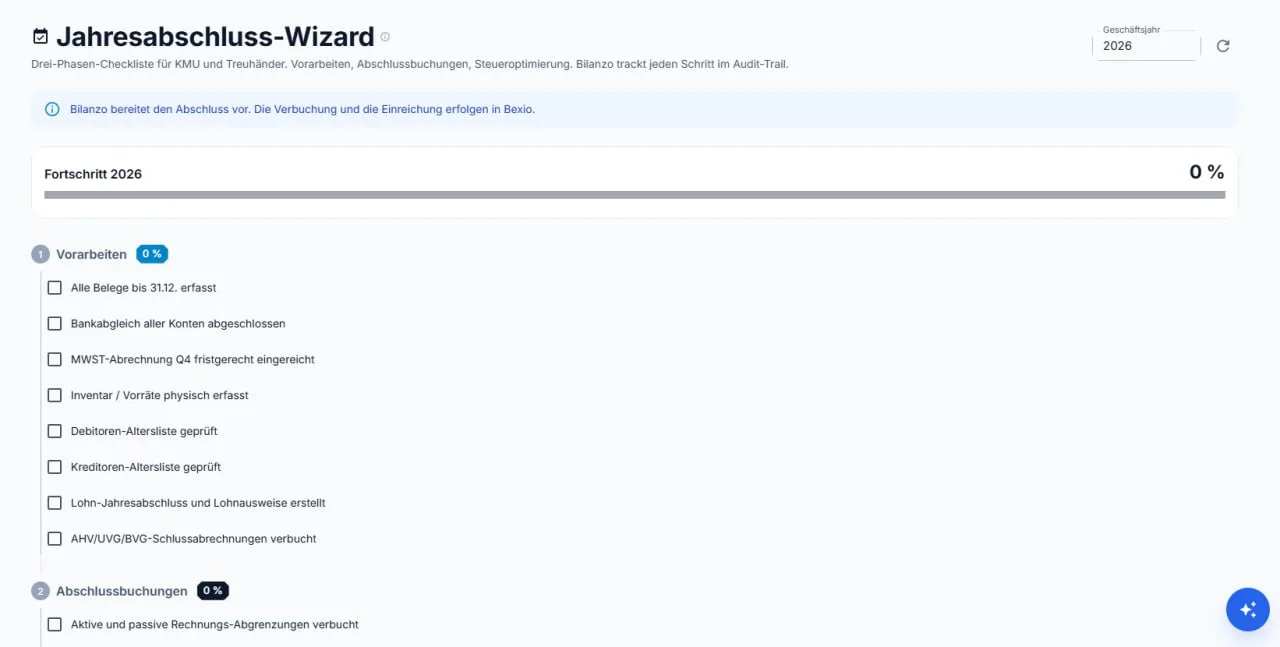
The year-end wizard walks you through the closing with a three-phase checklist: preparation (receipts, bank reconciliation, Q4 VAT, inventory, receivables/payables, payroll, AHV/UVG/BVG), closing entries (accruals and deferrals, for example) and tax optimisation.
Progress is tracked per financial year and every step lands in the audit trail.
Does the AI run on my machine or at an external provider?
FAQ
On your computer. The package ships the AI runtime (Ollama) and the models: the language model bilanzo:1.1.0 for the posting proposals and a vision model for reading receipt images. None of this is fetched from an external service, and your receipts never leave your device.
The language model is encrypted inside the package. The licence server delivers the key with the first confirmed licence check after activation; only then does Bilanzo unpack the model (4.37 GB), which takes a few minutes. Before that, the interface, receipts and bexio work, the AI proposals are missing, and the interface says so.
The AI listens on this computer only (127.0.0.1) and is not reachable from outside.
Which operating modes are there for posting?
FAQ
Three, and automatic posting is switched off as delivered. You have to enable and acknowledge it explicitly.
Manual (the default on every plan): every receipt goes into the review queue and you click "post".
Semi-automatic (from Standard up): Bilanzo works receipt by receipt and puts every booking to you individually for confirmation. You can stop at any time. Nothing runs in the background.
Fully automatic (Professional only): Bilanzo posts without an intermediate stop, provided the receipt is above your confidence threshold. A daily ceiling and a maximum amount per booking act as hard brakes.
Automatic bank reconciliation is not part of this. It is not available and its switch cannot be turned on.
How does automatic receipt categorisation work?
FAQ
Not through a list of keywords. Bilanzo keeps a knowledge graph of its own for each of your companies, on your device: a network of nodes and connections in which your suppliers, your accounts, your line items, your periods, the VAT context, the Swiss rules and your own decisions hang together. The model does not merely read the receipt, it asks that network.
Every connection carries its origin with it. Four origins may carry a posting: a rule with a citable source, a rule of your company, a decision by a person, the receipt itself. Four more may offer candidates and never conclude: similarity, vector proximity, model guess, and your bexio history. That is why every account proposal can be traced back instead of taken on faith.
If the chain does not close, nothing is guessed. The receipt goes into the review list with a concrete factual question. If you want that without exception, switch on the provenance gate in the settings: then there is no account proposal at all without a nameable chain of knowledge.
It is your network, not ours. The graph is created with the installation and fills up from your receipts, your chart of accounts and your corrections. An account is only linked if it appears in the chart of accounts of that very client. Each client has its own graph, separated at database level.
And it stays with you. Language model and vision model ship in the package and run on your machine. Your receipts go to no third-party AI provider.
What we do not claim: a hit rate in percent. We do not measure it at your site, so we do not quote it.
Does the AI learn from my corrections?
FAQ
Yes. Every manual correction is stored locally in your installation and improves the suggestions for future receipts from the same supplier. What is learned stays with you.
The base model that ships with the product is maintained by us and refreshed with an update.
Can the AI read handwritten receipts?
FAQ
Printed text is read reliably by the text recognition. For receipt images, including handwriting, Bilanzo additionally uses the bundled vision model, which understands the receipt as an image. Handwriting is recognised this way, but with a lower confidence value; such receipts go to the review list for checking.
Recommendation: prefer typed or printed receipts, photograph handwriting well lit and straight. Thermal-printed till receipts are recognised well.
Which languages does the AI recognise?
FAQ
Receipts in German, French, Italian and English are recognised. That covers the invoices that typically come up in Switzerland.
What is the review queue and how do I work with it?
FAQ
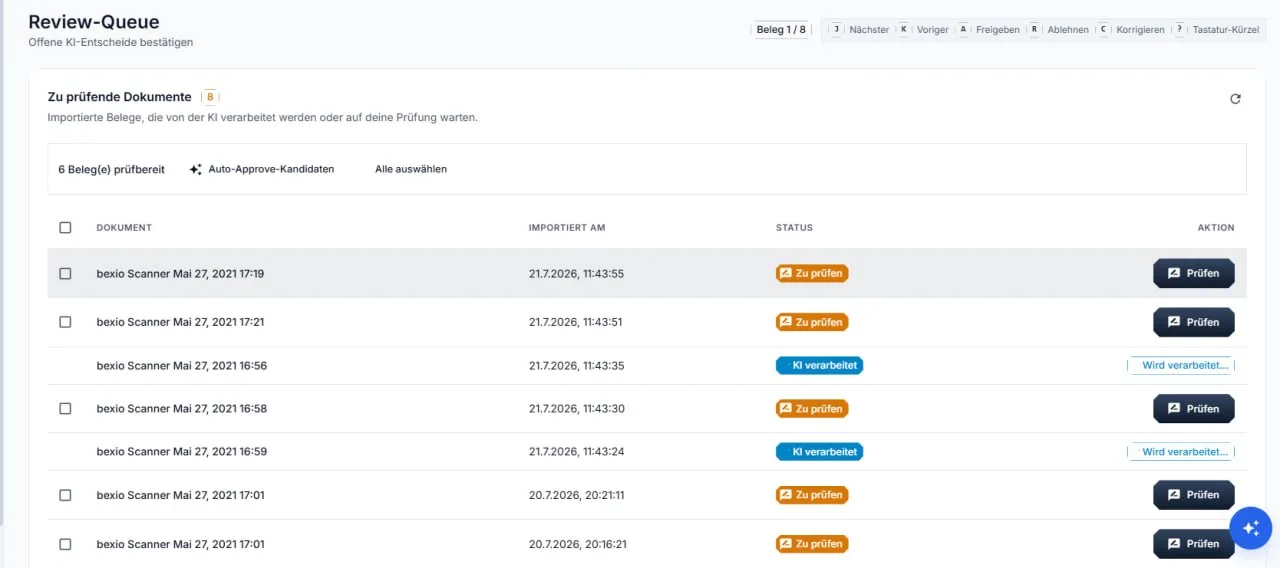
In the review queue you confirm pending AI decisions: receipts that have been processed and are waiting for your check. High-confidence receipts are proposed as approval candidates.
Keyboard shortcuts make this fast: J next receipt, K previous, A approve, R reject, C correct.
What does the bexio AI analysis do?
FAQ
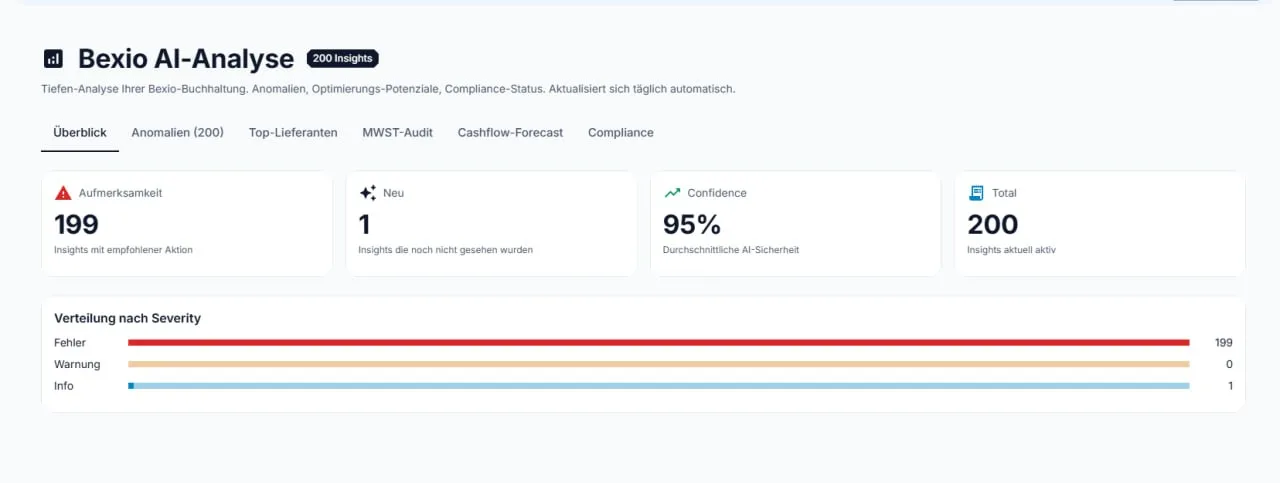
The bexio AI analysis is a deep analysis of your bexio books that refreshes daily. It delivers findings in six areas: overview, anomalies, top suppliers, VAT audit, cash-flow forecast and compliance.
Every finding carries a confidence score and a concrete recommendation; compliance notes cite the legal basis, for example art. 957a CO.
This analysis requires a connected bexio integration.
PDF: reports, VAT returns, annual accounts, QR invoices and the data protection disclosure
CSV: journal, account sheets, analyses and the eArchive event log. The file carries a byte order mark and opens in Excel without further steps
PAIN.001: payment instruction for payroll, as a file for your e-banking
ZIP, eArchive: the package per financial year with the receipts, the posting data per receipt, the chained event list, a checksum list with signature and a self-description for the auditor
ZIP, data protection: the data export for portability under DSG art. 28
There is no XLSX of its own. Where the interface says "Excel" you receive a CSV that Excel opens directly. It is not a real workbook with formatting and formulas.
CAMT.053 only goes in, not out: Bilanzo reads bank statements in that format and does not write them.
Can I import data from other accounting software?
FAQ
No, not from other accounting software. A bexio ledger is the prerequisite for using Bilanzo; your accounting data come from there.
What Bilanzo really reads in:
Bank statements as CAMT.053, MT940 or bank CSV under Bank import
Receipts as individual files, see "Which file formats does Bilanzo support?"
Your bexio ledger through the bexio connection: chart of accounts, contacts, payable and receivable invoices, journal
There is no import of journals, payable or receivable lists as CSV. It used to be claimed here and it was wrong. We promise nothing we have not built and measured.
If you work with other software today, move your books to bexio first. bexio has its own functions for that; Bilanzo does not interfere there.
Can I export all my data?
FAQ
Yes. But these are three different things and they belong apart.
1. Disclosure about your personal data. Under Privacy you receive the disclosure under DSG art. 25 as PDF, HTML or JSON, and the data export for portability under DSG art. 28 as a ZIP: master data, receipt metadata, entries and an excerpt of your actions. Once every 24 hours. The receipt files themselves are not included.
2. Your accounting data. The complete copy including receipt files is the backup under Settings > Backup: database, receipts and client settings in one encrypted file. That backup can be read into another Bilanzo installation, for instance when moving to a new machine.
Set a recovery code beforehand. Without it the key only sits next to the backup on the same device, and the file alone is of no use to you on a new machine.
3. Moving to or away from bexio. That route does not exist in Bilanzo and is not meant to happen in Bilanzo. Moving a ledger into bexio or out of bexio is a matter for bexio's own functions. That is the important distinction: Bilanzo hands out your data, bexio performs the change of the leading ledger.
On top of that come the reports for reading and passing on: balance sheet, income statement, account sheets, receivables and payables list as PDF or CSV, and the eArchive package per financial year. All of it lives on your device.
What is GetMyInvoices and which plan includes it?
FAQ
GetMyInvoices is a service that collects invoices from your online portals, for example telephone providers, hosters or suppliers. Bilanzo is meant to fetch those invoices and place them as receipts in the review list instead of you downloading them one by one.
This connection is in preparation. The interface is built, but we have not yet measured it against a real GetMyInvoices account. As long as that is not measured we do not promise it, and it belongs in no subscription comparison.
As soon as the measurement exists, this is where you will find which subscription includes the connection and how you connect it.
Standard, CHF 199 per month: one client, one user, manual and semi-automatic posting
Professional, CHF 299 per month: unlimited clients (the first included, each further one CHF 50 per month), up to 5 users, additionally fully automatic posting, ePost and Amnis, white label and priority support
Receipts are unlimited in Standard and Professional; only the trial is limited to 100 receipts. On the annual plan the tariffs cost CHF 1'990 and CHF 2'990, which equals two months free. Both plans can be cancelled monthly. All prices and features at bilanzo.ch/#preise.
What is the difference between Standard and Professional?
Subscription
The bookkeeping itself is the same in both: same receipt processing without a receipt counter, same chart of accounts, same VAT return, same annual accounts, same eArchive, same connection to bexio and GetMyInvoices.
Professional adds:
Fully automatic posting. Standard works manually or semi-automatically with confirmation per posting.
Unlimited clients instead of one (each further client CHF 50 per month).
Up to 5 users instead of one.
ePost and Amnis as integrations.
White label: your logo and your product name for your clients. Professional only.
Priority support.
If you keep the books for your own company alone and want to see every posting anyway, Standard is right. If you manage several clients, work in a team or appear under your own name, you need Professional.
What does an additional client cost?
Subscription
CHF 50 per client and month on the Professional plan; the first client is included. The Standard plan covers one client; if you need a second one, you switch to Professional.
Fiduciaries pay a tiered rate for their customers’ clients: CHF 75 per client and month up to 5 clients, CHF 60 up to 20 clients, CHF 50 from the 21st client (see /treuhand/).
An additional client brings a separate set of books of its own, with its own receipts, accounts, VAT returns and reports.
How and when am I billed?
Subscription
Monthly or annually, by credit card or direct debit. Invoices arrive by e-mail.
Annual subscriptions are invoiced in full at the start of the term.
How do I cancel my subscription?
Subscription
At any time under Account > Subscription > Cancel. The subscription runs to the end of the period you have paid for. There is no minimum term.
What happens to my data when I cancel?
Subscription
Your data stays where it is: on your device. We delete nothing, because we do not hold your accounts at all.
After the paid period ends, Bilanzo locks access to the application. The database and the receipts remain in your installation. So take your data out before the end, while access is open:
Settings > Backup for the complete backup including receipts; Privacy > Data export for the ZIP with master data, receipt metadata, entries and action excerpt
the eArchive package per financial year, audit-proof with checksums
the reports you need, as PDF and XLSX
This covers your retention duty under CO art. 958f, regardless of the subscription.
Backups remain readable too: the key lies as file .localwrapkey next to the backups. Always copy the whole backups folder including this file; a backup without the key cannot be opened.
Are there terms for fiduciaries?
Subscription
Yes. Fiduciaries and accountants keep their customers’ clients in Bilanzo and pay a tiered rate: CHF 75 per client and month up to 5 clients, CHF 60 up to 20 clients, CHF 50 from the 21st client.
Launch offer for fiduciaries: the first 150 fiduciaries pay a one-off CHF 299 for the setup and no monthly base fee, only the clients. From the 151st fiduciary a base fee of CHF 299 per month applies plus the clients. It is always one or the other: the one-off setup or the monthly base fee. Details at /treuhand/.
The test customer programme at /testkunden/ is aimed at SMEs with their own company, not at fiduciaries.
Your own branding (white label: your logo and your product name for your clients) is part of the Professional subscription and not included in any other plan.
Can I transfer the subscription to another user?
Subscription
Yes. Under Account > User administration you change the account holder or add further users. For a transfer to a different e-mail address contact [email protected].
On your own computer. Bilanzo Local is installed and run at your premises. Receipts, postings, client data and the AI analysis are held exclusively in the local database of your installation. There is no Bilanzo data centre holding your accounting data.
The data folder on Windows: for a new installation the folder daten inside the program folder, usually C:\Program Files\Mediaquotes\Bilanzo Local\daten; for an existing installation from earlier versions it stays C:\ProgramData\Bilanzo Local. It holds the database (postgres), your receipts (app\data\documents), the GeBüV archive, the backups (backups) and the logs. An update replaces only the program part and does not touch database, receipts or backups.
These connections leave your device, and only these: the licence check, the update query, support requests you make yourself, plus the official daily rates and legal sources from estv.admin.ch, bazg.admin.ch and fedlex.admin.ch. Additionally, and only if you explicitly connect them: bexio, ePost, GetMyInvoices and Amnis. Your receipts go to no external AI provider. The language model runs on your device.
How is my data encrypted?
Security
Bilanzo uses the following encryption:
Transport: HTTPS, at least TLS 1.2, TLS 1.3 where the client supports it. Bilanzo additionally checks the licence server certificate against a pinned fingerprint; a broken-open channel, as some virus scanners create, is detected.
Secrets of the installation (database passwords, bexio token, credentials for ePost and GetMyInvoices): sealed with Windows data protection (DPAPI), bound to this computer. On another computer the seal cannot be opened.
AI model: encrypted in the package (AES-256); the key arrives with the licence check and is never written to disk.
Backups: as an encrypted file (.blze, AES-256-GCM). The key lies as .localwrapkey next to the backups and is not bound to the device: whoever copies the folder including the key can read the backup on any computer; without the key, nobody.
Client separation: at database level via Row Level Security. No client sees another client's data.
The accounting database itself is stored unencrypted in your installation; for disk encryption please use BitLocker. All services listen on this computer only (127.0.0.1); no port is reachable from outside.
Is Bilanzo GDPR and revDSG compliant?
Security
Bilanzo is built for both frameworks:
the Swiss Data Protection Act (revDSG, in force since 1 September 2023)
the EU GDPR (for customers resident in the EU or with EU business partners)
The starting point helps: because the books never leave your device, there is no processing of the receipt data by us.
A template data processing agreement is available at /dpa.
How do I back up my bookkeeping?
Security
Bilanzo backs up on its own, and you can back up yourself at any time.
A backup runs automatically daily (at night) and additionally weekly, as long as Bilanzo is running; a switched-off computer does not back up. Both are on by default. Under Settings > Backup you create a backup by hand, see the list, verify readability and restore if needed.
A backup (.blze) contains the database, receipt files and the client's settings, encrypted with AES-256-GCM. It lies in the backups folder in the data folder, together with the key file .localwrapkey.
If the backups are on the same disk as the accounts, they are lost together with it if the disk fails. Put the backup folder on another drive and always copy the whole folder, key file included. A backup without .localwrapkey cannot be opened anywhere; with both, on any computer.
Before every update Bilanzo additionally takes a database dump itself, and the uninstall exports the accounts before removing anything.
What happens if I forget my password?
Security
Bilanzo Local runs on your device and has no central account through which a password could be reset by e-mail. There is therefore no password reset by e-mail.
Another administrator of your installation sets a new password for you in User management.
If there is no other administrator, contact [email protected]. Recovery requires access to the computer.
The password of your customer account on bilanzo.ch is separate and can be reset there as usual.
What is Bilanzo eArchive and how does audit-proof archiving work?
Security
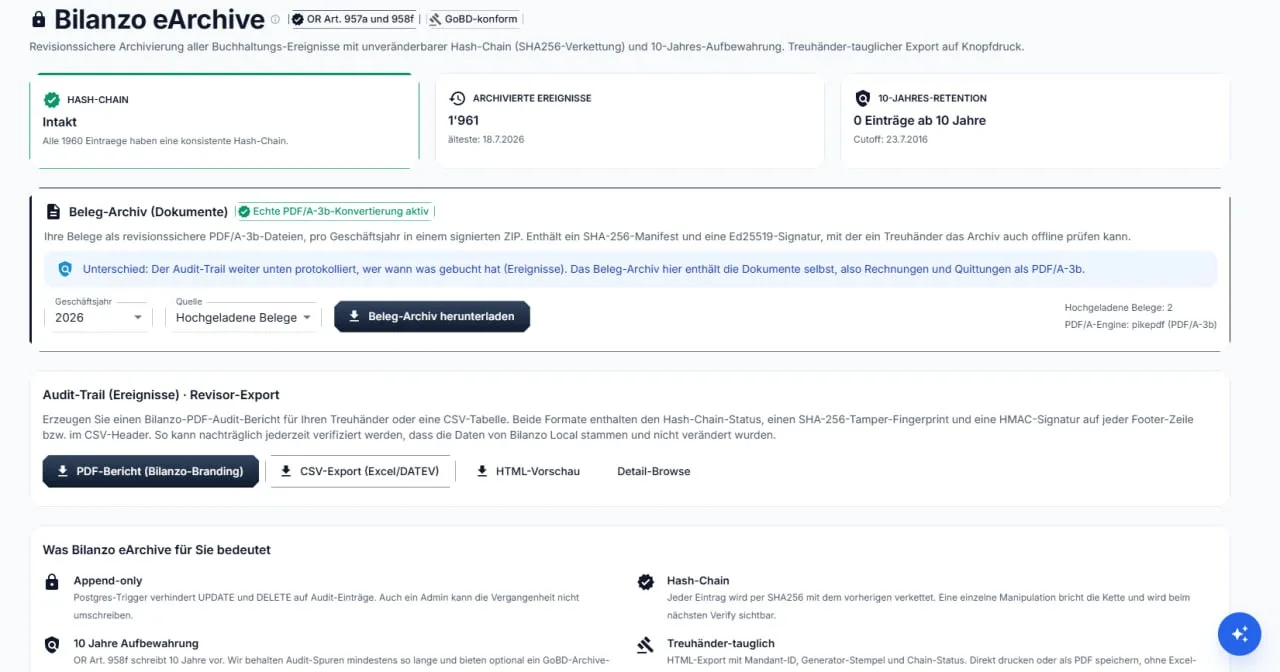
Bilanzo eArchive records every bookkeeping event in an audit-proof way under art. 957a and 958f CO:
Append only: changing or deleting audit trail entries afterwards is technically prevented, administrators included
Hash chain: each entry is chained to the previous one with SHA-256, so tampering breaks the chain visibly
Receipt archive: receipts as PDF/A-3b, per financial year in a signed ZIP with a SHA-256 manifest and an Ed25519 signature
Ten-year retention under art. 958f CO
For the audit you export a PDF audit report or a CSV table at the press of a button, both with a checksum and a signature. A fiduciary can verify the archive offline with it.
Windows: Windows 10 from version 1809 or Windows 11, 64-bit. Bilanzo runs natively as a Windows program with its own Windows services, without Hyper-V and without virtualisation in the BIOS.
macOS: in preparation (one code base, three installers), no download available yet
Linux: available at /download, as a .deb package (Ubuntu 24.04 or newer, x86_64) and as a tar.gz archive for other distributions with systemd
What hardware do I need?
FAQ
Minimum:
Windows 10 from version 1809 or Windows 11, 64-bit
16 GB RAM according to the setup. With 8 GB Bilanzo starts, but switches to economy mode without the language model when memory is short (see below)
NVIDIA graphics card with a current driver, mandatory. There is deliberately no CPU mode; without an NVIDIA card Bilanzo does not start
Disk space: the package is about 5.5 GB packed and about 6.8 GB unpacked, of which the AI model is 4.37 GB; database, receipts and backups come on top. The assistant calculates the requirement before installation and names it; if there is not enough space, it aborts
Internet access at first start, for the licence check and for updates
Recommended:
16 GB RAM or more, NVIDIA card with 8 GB video memory or more
SSD instead of hard disk
Full HD or higher resolution
Economy mode: before every start Bilanzo measures the free RAM and the space in the data folder. If either is insufficient, Bilanzo still starts, but without the language model: database, interface, receipts and bexio run, the AI analysis rests, and a window says so. As soon as space and memory suffice, the next run starts normally. No additional software or virtualisation is needed.
Does Bilanzo work without internet?
FAQ
Receipt recognition, posting proposals and the whole bookkeeping run locally and need no internet. A connection is needed for:
the licence check (every 15 minutes, every 5 minutes under AI load)
the update of the official daily rates
updates
the optional integrations (bexio, ePost, GetMyInvoices, Amnis)
If the connection to the licence server fails, Bilanzo keeps working: after 4 hours without a confirmed check a banner "Licence server unreachable since ..." appears, nothing else changes. After 72 hours only the writing functions are locked; reading, searching and exporting continue. As soon as the connection is back, everything is free immediately. A weekend without network or a closed laptop locks nobody out.
How does an update reach me?
FAQ
Bilanzo asks bilanzo.ch whether a new version exists and checks the answer against a pinned signature. What happens then is up to you under Settings > Updates: ask, only notify, download in the background, or apply at next start.
The update run itself:
Download the package (resumable), verify checksum and signature before anything is unpacked
Take a database dump and set the current program part aside (rollback path)
Swap the program part, carry over your settings, start the services, verify the database
Your accounts, receipts, backups and what the AI has learned lie outside the program part and are not touched by the update. If something goes wrong, the update rolls back by itself; the previous version can also be restored by hand. The package is several gigabytes; how long the download takes depends on your line.
An update via the setup (new version over the existing installation) is also possible and keeps data folder and secrets.
What runs on my computer while Bilanzo is running?
FAQ
Bilanzo Local consists of a few visible parts. All of them listen on this computer only (127.0.0.1); no port is reachable from outside.
Two Windows services: BilanzoPostgres (the accounting database, PostgreSQL 15) and BilanzoRedis (queue and locks). They start with Windows.
Three application processes as the signed-in user: the application with interface and API (port 3100), the worker that processes receipts, and the scheduler for the planned runs (bexio journal and bank, daily rates, retention).
The AI (Ollama with the bundled models), also local only.
The tray icon in the taskbar: shows "Running" or "Stopped", opens the interface and the logs, starts and stops the application.
Bilanzo starts automatically at every sign-in (task "Bilanzo Local Auto-Start", 60 seconds after sign-in). Administrator rights are needed only for installation and for an update via the setup; operation runs without them.
How do I uninstall Bilanzo, and what remains of my data?
Guide
Via Windows Settings, Apps, "Bilanzo Local". The uninstall backs up first and removes only afterwards:
Export of your accounts to Documents\Bilanzo-Export-<date>_<time> before anything is removed: the database as a readable SQL file, your receipts, the GeBüV archive, the whole sicherungen folder including the key file, plus a checksum list and the file "WICHTIG-Bitte-lesen.txt"
Proof: the export is counted and checked against the database. If it fails, the uninstall aborts and names the reason in one sentence; nothing is deleted then
Only after a proven export are services, program and data folder removed. Only the logs remain for troubleshooting
Afterwards your accounts lie exclusively in the export folder under Documents. The receipts thus remain in the backup, not in the installation path. Keep this folder; the backups in it can be restored on any computer together with the key file.
Type http://localhost:3100 by hand. If the page stays empty, wait a minute: at first start Bilanzo sets up the services, and that takes time.
If that does not help:
Look at the Bilanzo tray icon: if it shows "Stopped", choose "start" there or use the "Restart" button in the interface (bilanzo://restart)
If the launcher reports "Port in use" with the name of a program, close that program and start Bilanzo again. Bilanzo does not switch to another port
If Windows reports that the BilanzoPostgres service is not running, a full disk is the usual cause: free up space, then start Bilanzo again
The emergency page of the tray icon shows why the interface does not answer and offers "Create diagnostics". This puts a ZIP with the logs, without secrets, on the desktop; send it to [email protected].
Sign-in fails even though the password is right
FAQ
Usually it is the address. The session cookie applies exactly to the origin you signed in under.
Open the interface at http://localhost:3100 again, not under another name and not via the IP address
Sign in there once more
"Sign in with bexio" needs no setup on your side: the button forwards you to auth.bexio.com, where you sign in with your bexio account. If that fails, it is usually one of three things: the licence is not activated yet (the bexio access reaches your computer with the licence check), the browser blocks the redirect, or you used a different bexio account than the one linked to your company. Signing in with e-mail and password works regardless.
Text recognition returns wrong results
FAQ
Common causes:
image quality too low (below 150 dpi)
the receipt is badly skewed or crumpled
a very unusual typeface
Remedies:
Rescan the receipt at 200 dpi or better
Lay it straight on the glass
Upload it as PDF rather than JPG
Correct the receipt by hand afterwards. The correction is learned and applies to the next receipts from the same supplier.
I get the message "licence expired"
FAQ
Cause A: the trial is used up (100 receipts). Remedy: take out a subscription.
Cause B: the paid subscription counts as expired in the system. Remedy: check the status under My account.
Cause C: the machine has been without a connection to the licence server for too long. After 4 hours only a banner appears, after 72 hours the writing functions are locked. Remedy: restore the connection, then everything is free again immediately.
Cause D: the computer has new hardware (disk, mainboard) or Windows was reinstalled; the installation no longer matches the licence fingerprint. Remedy: activate the licence again with the same key.
VPN and firewall: outgoing connections on port 443 (HTTPS) must be allowed
Virus scanners that break open HTTPS: Bilanzo detects the broken-open channel and refuses it. Exempt Bilanzo in the scanner.
Restart Bilanzo
Bilanzo does not synchronise your bookkeeping to any cloud. Only the optional integrations and the licence check are affected here.
Printing or the PDF export comes out empty
FAQ
What to do:
Export as PDF instead of printing directly
Open the PDF in a different viewer
Check whether the entries for that period are complete
For reports, check the date range for completeness
How do I get help if none of this fits?
FAQ
Write to [email protected] and describe what you did and what happened. Attach the diagnostics package: the "Create diagnostics" button in the interface (or on the emergency page of the tray icon) collects the logs without secrets into a ZIP on the desktop. Nothing is sent without your hand.
If that is not enough, we arrange a session in which you show us your screen. We name the time and the tool in the reply to your request, never unsolicited.
We do not call you unsolicited and never ask by phone for remote access, a password or a payment. If you receive such a call or e-mail, do not respond and report it to us.
An open REST API with its own access keys is not available today.
Bilanzo ships ready-made integrations: bexio, ePost, GetMyInvoices, Amnis, plus bank data exchange via CAMT.053, MT940 and PAIN.001.
If you need a connection to a further system, write to [email protected].
Are there webhooks?
FAQ
Webhooks are not available today.
For exchange with other systems, use the ready-made integrations (bexio, ePost, GetMyInvoices, Amnis) or bank data exchange via CAMT.053, MT940 and PAIN.001.
Can I connect Bilanzo to my ERP?
FAQ
An open interface for arbitrary third-party systems does not exist today.
bexio, ePost, GetMyInvoices and Amnis are connected out of the box. The file route is open: CSV for the journal, CAMT.053 and MT940 for bank statements, PAIN.001 for payment instructions.
Sign-in to the interface runs on an HttpOnly session cookie with a 12-hour lifetime. If you keep working it renews automatically; an idle session expires after 12 hours, and closing the browser ends it as well.
Because there is no public API, there are also no API tokens that could be lost.
From the release
Nobody writes these answers by hand. They are produced at build time from the package's own data.
Which version of Bilanzo Local is the current one?
FAQ
The current version is Bilanzo Local 1.3.4, released on 2026-09-22.
This statement is not typed into this page. It comes from the release note of the package and is set anew with every build; if it does not match the package, the help is not shipped at all.
How an update reaches you is described under "How does an update reach me?".
Which system requirements apply to the current version?
Guide
Measured on package 1.3.4:
Operating system: Windows 10 (Build 17763) oder Windows 11, 64 bit
Memory: 16 GB recommended
Graphics card: NVIDIA with 8 GB of memory for the language model
Free disk space: 47.7 GB on the target drive
The installer checks the space before it starts and tells you the shortfall, instead of stopping halfway.
These figures are measured on the built package, not estimated. With the next version the next version's figures stand here.
What does Bilanzo promise, and how is it checked?
FAQ
Bilanzo keeps a list of its promises to you. It currently holds 77 promises and 77 check points: every promise has exactly one check point, and every check point names its promise.
A check point knows three results:
green: measured on a running installation and passed
red: measured on a running installation and failed
unmeasured: not measured, with a reason. Never counts as green
A source passage that has been read is not green. An interface that answers is not proof that its content is right.
This list is exhaustive: what is not on it is not a promise from us.
The feature table lists 79 functions. We measured every single one against package 1.3.4, line by line, instead of asserting it:
44 carry without limitation
9 carry with one measured limitation
19 are available but never measured on a running installation
7 are in preparation and are listed here as such
We write this down because it helps you: you should know before buying what works today. What is in preparation appears in the sections below at the function concerned, by name.
On 3 November 2026 we rechecked against the source code the 16 lines that were in preparation in package 1.3.4 and that the table lists as included today. They are built and are listed as “available but never measured on a running installation” until a measurement on a running installation exists.
Which volume limits apply per subscription?
Subscription
Three limits separate the subscriptions. The values come from the same feature table shown on the Features page:
Receipts in total: trial 100, Standard 100'000, Professional 1'000'000
Bank reconciliations: trial 10, Standard unlimited, Professional unlimited
Users: trial 1, Standard 1, Professional 5
What else the trial covers is under “What can I do during the trial?”. The prices per subscription are under Pricing.
Until the receipt is recognised: what of it exists today?
FAQ
9 functions: how the receipt comes in and is read
This section covers 9 functions. Measured against package 1.3.4, updated against the source code on 3 November 2026:
One inbox for all sources: available
Phone as receipt scanner: available, not yet measured on a running installation
bexio inbox as receipt source: available, with one measured limitation
GetMyInvoices as receipt source: available
ePost inbox of Swiss Post: available, not yet measured on a running installation
Import bank statements as CAMT or PDF: available
Teach your own receipt template from a sample: available, not yet measured on a running installation
AI receipt recognition, handwriting included: available
Read individual items per invoice line: available
Every line has its own entry below. What is listed here as in preparation is not something we promise you today.
One inbox for all sources
FAQ
State: available. Included in all subscriptions.
This function appears in the feature table under “Until the receipt is recognised”. The state is measured against package 1.3.4, not estimated.
The full table with all 79 functions and the three subscriptions is at Features.
Phone as receipt scanner
FAQ
State: available, not yet measured on a running installation. Included in all subscriptions.
This function appears in the feature table under “Until the receipt is recognised”. The state is measured against package 1.3.4, not estimated.
The full table with all 79 functions and the three subscriptions is at Features.
bexio inbox as receipt source
FAQ
State: available, with one measured limitation. Included in all subscriptions.
This function appears in the feature table under “Until the receipt is recognised”. The state is measured against package 1.3.4, not estimated.
The full table with all 79 functions and the three subscriptions is at Features.
GetMyInvoices as receipt source
FAQ
State: available. Included in all subscriptions.
This function appears in the feature table under “Until the receipt is recognised”. The state is measured against package 1.3.4, not estimated.
The full table with all 79 functions and the three subscriptions is at Features.
ePost inbox of Swiss Post
FAQ
State: available, not yet measured on a running installation. For availability per subscription see the feature table.
This function appears in the feature table under “Until the receipt is recognised”. The state is checked against the source code of 3 November 2026, not estimated.
The full table with all 79 functions and the three subscriptions is at Features.
Import bank statements as CAMT or PDF
FAQ
State: available. Included in all subscriptions.
This function appears in the feature table under “Until the receipt is recognised”. The state is measured against package 1.3.4, not estimated.
The full table with all 79 functions and the three subscriptions is at Features.
Teach your own receipt template from a sample
FAQ
State: available, not yet measured on a running installation. Included in all subscriptions.
This function appears in the feature table under “Until the receipt is recognised”. The state is measured against package 1.3.4, not estimated.
The full table with all 79 functions and the three subscriptions is at Features.
AI receipt recognition, handwriting included
FAQ
State: available. Included in all subscriptions.
This function appears in the feature table under “Until the receipt is recognised”. The state is measured against package 1.3.4, not estimated.
The full table with all 79 functions and the three subscriptions is at Features.
Read individual items per invoice line
FAQ
State: available. Included in all subscriptions.
This function appears in the feature table under “Until the receipt is recognised”. The state is measured against package 1.3.4, not estimated.
The full table with all 79 functions and the three subscriptions is at Features.
Adaptive bookkeeping memory
Learns from your corrections, your lists and your company rules.
Adaptive bookkeeping memory: what of it exists today?
FAQ
Learns from your corrections, your lists and your company rules.
This section covers 5 functions. Measured against package 1.3.4, updated against the source code on 3 November 2026:
Learns from every correction you make: available
Learns once from your existing books: available, with one measured limitation
Own learning model per client, version can be rolled back: in preparation
The model states its reading, you can object: available, not yet measured on a running installation
Learning progress visible as a percentage: available, not yet measured on a running installation
Every line has its own entry below. What is listed here as in preparation is not something we promise you today.
Learns from every correction you make
FAQ
State: available. Included in all subscriptions.
This function appears in the feature table under “Adaptive bookkeeping memory”. The state is measured against package 1.3.4, not estimated.
The full table with all 79 functions and the three subscriptions is at Features.
Learns once from your existing books
FAQ
State: available, with one measured limitation. Included in all subscriptions.
This function appears in the feature table under “Adaptive bookkeeping memory”. The state is measured against package 1.3.4, not estimated.
The full table with all 79 functions and the three subscriptions is at Features.
Own learning model per client, version can be rolled back
FAQ
State: in preparation. For availability per subscription see the feature table.
This function appears in the feature table under “Adaptive bookkeeping memory”. The state is measured against package 1.3.4, not estimated.
The full table with all 79 functions and the three subscriptions is at Features.
The model states its reading, you can object
FAQ
State: available, not yet measured on a running installation. Included in all subscriptions.
This function appears in the feature table under “Adaptive bookkeeping memory”. The state is checked against the source code of 3 November 2026, not estimated.
The full table with all 79 functions and the three subscriptions is at Features.
Learning progress visible as a percentage
FAQ
State: available, not yet measured on a running installation. Included in the trial version only.
This function appears in the feature table under “Adaptive bookkeeping memory”. The state is checked against the source code of 3 November 2026, not estimated.
The full table with all 79 functions and the three subscriptions is at Features.
What works in the background
You cannot click these eight. They act on every suggestion you see.
What works in the background: what of it exists today?
FAQ
You cannot click these eight. They act on every suggestion you see.
This section covers 8 functions. Measured against package 1.3.4, updated against the source code on 3 November 2026:
Account and VAT rate per supplier, after your first confirmation: available, not yet measured on a running installation
Keeps learning every night, even when you are not working: available
Justifies the suggestion with your closest earlier case: available, not yet measured on a running installation
Calibrates the confidence value against your own hit rate: available
Reports when a recurring posting deviates from the usual account: available, not yet measured on a running installation
Every learned rule carries its origin and validity date: available, with one measured limitation
No account suggestion without a nameable chain of knowledge: available, not yet measured on a running installation
Fixed plausibility checks run before every suggestion: available
Every line has its own entry below. What is listed here as in preparation is not something we promise you today.
Account and VAT rate per supplier, after your first confirmation
FAQ
State: available, not yet measured on a running installation. Included in all subscriptions.
This function appears in the feature table under “What works in the background”. The state is checked against the source code of 3 November 2026, not estimated.
The full table with all 79 functions and the three subscriptions is at Features.
Keeps learning every night, even when you are not working
FAQ
State: available. Included in all subscriptions.
This function appears in the feature table under “What works in the background”. The state is measured against package 1.3.4, not estimated.
The full table with all 79 functions and the three subscriptions is at Features.
Justifies the suggestion with your closest earlier case
FAQ
State: available, not yet measured on a running installation. Included in all subscriptions.
This function appears in the feature table under “What works in the background”. The state is checked against the source code of 3 November 2026, not estimated.
The full table with all 79 functions and the three subscriptions is at Features.
Calibrates the confidence value against your own hit rate
FAQ
State: available. Included in all subscriptions.
This function appears in the feature table under “What works in the background”. The state is measured against package 1.3.4, not estimated.
The full table with all 79 functions and the three subscriptions is at Features.
Reports when a recurring posting deviates from the usual account
FAQ
State: available, not yet measured on a running installation. Included in all subscriptions.
This function appears in the feature table under “What works in the background”. The state is checked against the source code of 3 November 2026, not estimated.
The full table with all 79 functions and the three subscriptions is at Features.
Every learned rule carries its origin and validity date
FAQ
State: available, with one measured limitation. Included in all subscriptions.
This function appears in the feature table under “What works in the background”. The state is measured against package 1.3.4, not estimated.
The full table with all 79 functions and the three subscriptions is at Features.
No account suggestion without a nameable chain of knowledge
FAQ
State: available, not yet measured on a running installation. Included in all subscriptions.
This function appears in the feature table under “What works in the background”. The state is checked against the source code of 3 November 2026, not estimated.
The full table with all 79 functions and the three subscriptions is at Features.
Fixed plausibility checks run before every suggestion
FAQ
State: available. Included in all subscriptions.
This function appears in the feature table under “What works in the background”. The state is measured against package 1.3.4, not estimated.
The full table with all 79 functions and the three subscriptions is at Features.
From recognised receipt to finished posting: what of it exists today?
FAQ
From recognised receipt to finished posting
This section covers 5 functions. Measured against package 1.3.4:
Review queue with keyboard shortcuts J K A R C: available, with one measured limitation
Dictate instead of typing: in preparation
Semi-automatic, one click per receipt: available
Fully automatic with confidence threshold: available
Control desk, process everything across all channels: available, with one measured limitation
Every line has its own entry below. What is listed here as in preparation is not something we promise you today.
Review queue with keyboard shortcuts J K A R C
FAQ
State: available, with one measured limitation. Included in all subscriptions.
This function appears in the feature table under “From recognised receipt to finished posting”. The state is measured against package 1.3.4, not estimated.
The full table with all 79 functions and the three subscriptions is at Features.
Dictate instead of typing
FAQ
State: in preparation. For availability per subscription see the feature table.
This function appears in the feature table under “From recognised receipt to finished posting”. The state is measured against package 1.3.4, not estimated.
The full table with all 79 functions and the three subscriptions is at Features.
Semi-automatic, one click per receipt
FAQ
State: available. Included from the Standard subscription.
This function appears in the feature table under “From recognised receipt to finished posting”. The state is measured against package 1.3.4, not estimated.
The full table with all 79 functions and the three subscriptions is at Features.
Fully automatic with confidence threshold
FAQ
State: available. Included in the Professional subscription.
This function appears in the feature table under “From recognised receipt to finished posting”. The state is measured against package 1.3.4, not estimated.
The full table with all 79 functions and the three subscriptions is at Features.
Control desk, process everything across all channels
FAQ
State: available, with one measured limitation. Included in the Professional subscription.
This function appears in the feature table under “From recognised receipt to finished posting”. The state is measured against package 1.3.4, not estimated.
The full table with all 79 functions and the three subscriptions is at Features.
Your lists the memory learns from: what of it exists today?
FAQ
Your lists the memory learns from
This section covers 13 functions. Measured against package 1.3.4, updated against the source code on 3 November 2026:
Client chart of accounts, templates included: available
Cost centres as a tree, split postings across them: available, not yet measured on a running installation
Supplier master with default account and default tax code: available
Customer master with payment term, credit limit and due dates: available
Aliases: map spellings and brands to supplier and account: available
VAT net tax rates with approval and validity: available, not yet measured on a running installation
VAT form figures per reporting period: available
Map tax codes to the statutory VAT types: available
Fixed asset register with useful life and depreciation: available
Employee master and payroll parameters: available
Own knowledge sources as PDF or web address: in preparation
Recurring invoices with a schedule: available
Member list and open contributions: available
Every line has its own entry below. What is listed here as in preparation is not something we promise you today.
Client chart of accounts, templates included
FAQ
State: available. Included in all subscriptions.
This function appears in the feature table under “Your lists the memory learns from”. The state is measured against package 1.3.4, not estimated.
The full table with all 79 functions and the three subscriptions is at Features.
Cost centres as a tree, split postings across them
FAQ
State: available, not yet measured on a running installation. Included in all subscriptions.
This function appears in the feature table under “Your lists the memory learns from”. The state is checked against the source code of 3 November 2026, not estimated.
The full table with all 79 functions and the three subscriptions is at Features.
Supplier master with default account and default tax code
FAQ
State: available. Included in all subscriptions.
This function appears in the feature table under “Your lists the memory learns from”. The state is measured against package 1.3.4, not estimated.
The full table with all 79 functions and the three subscriptions is at Features.
Customer master with payment term, credit limit and due dates
FAQ
State: available. Included in all subscriptions.
This function appears in the feature table under “Your lists the memory learns from”. The state is measured against package 1.3.4, not estimated.
The full table with all 79 functions and the three subscriptions is at Features.
Aliases: map spellings and brands to supplier and account
FAQ
State: available. Included in all subscriptions.
This function appears in the feature table under “Your lists the memory learns from”. The state is measured against package 1.3.4, not estimated.
The full table with all 79 functions and the three subscriptions is at Features.
VAT net tax rates with approval and validity
FAQ
State: available, not yet measured on a running installation. Included in all subscriptions.
This function appears in the feature table under “Your lists the memory learns from”. The state is checked against the source code of 3 November 2026, not estimated.
The full table with all 79 functions and the three subscriptions is at Features.
VAT form figures per reporting period
FAQ
State: available. Included in all subscriptions.
This function appears in the feature table under “Your lists the memory learns from”. The state is measured against package 1.3.4, not estimated.
The full table with all 79 functions and the three subscriptions is at Features.
Map tax codes to the statutory VAT types
FAQ
State: available. Included in all subscriptions.
This function appears in the feature table under “Your lists the memory learns from”. The state is measured against package 1.3.4, not estimated.
The full table with all 79 functions and the three subscriptions is at Features.
Fixed asset register with useful life and depreciation
FAQ
State: available. Included in all subscriptions.
This function appears in the feature table under “Your lists the memory learns from”. The state is measured against package 1.3.4, not estimated.
The full table with all 79 functions and the three subscriptions is at Features.
Employee master and payroll parameters
FAQ
State: available. Included in all subscriptions.
This function appears in the feature table under “Your lists the memory learns from”. The state is measured against package 1.3.4, not estimated.
The full table with all 79 functions and the three subscriptions is at Features.
Own knowledge sources as PDF or web address
FAQ
State: in preparation. Included in all subscriptions.
This function appears in the feature table under “Your lists the memory learns from”. The state is measured against package 1.3.4, not estimated.
The full table with all 79 functions and the three subscriptions is at Features.
Recurring invoices with a schedule
FAQ
State: available. Included in all subscriptions.
This function appears in the feature table under “Your lists the memory learns from”. The state is measured against package 1.3.4, not estimated.
The full table with all 79 functions and the three subscriptions is at Features.
Member list and open contributions
FAQ
State: available. Included in all subscriptions.
This function appears in the feature table under “Your lists the memory learns from”. The state is measured against package 1.3.4, not estimated.
The full table with all 79 functions and the three subscriptions is at Features.
Closing, VAT and Swiss law: what of it exists today?
FAQ
Closing, VAT and Swiss law
This section covers 18 functions. Measured against package 1.3.4, updated against the source code on 3 November 2026:
Balance sheet, income statement, trial balance, account ledger: available
VAT return per quarter and half-year by FTA figures: available
Collect, document and export acquisition tax: available, not yet measured on a running installation
Create accruals under CO 958b and post them to bexio: available, not yet measured on a running installation
Fixed assets with rate, method and monthly depreciation: available
Closing checklist, preparation and year-end closing: available
Lock and reopen periods and VAT quarters, GeBüV: available
Late receipts in already locked years: available
Up-to-date view: which receipts, postings and reconciliations are missing: available
Three-level dunning with templates and due list: available
Create QR bills: in preparation
Payroll: employees, periods, payroll run: available
Timesheet with release for the payroll run: available
Expenses: form route and receipt route: available
Calculate AHV self-employment and generate the registration PDF: available, with one measured limitation
Monthly report to the debt enforcement office under DEBA 93: available
Foreign exchange rates, history and revaluation: available
Group consolidation including cash flow statement (structured like CO Art. 961b, indirect from the bexio books; not a recognised accounting standard): available, not yet measured on a running installation
Every line has its own entry below. What is listed here as in preparation is not something we promise you today.
Balance sheet, income statement, trial balance, account ledger
FAQ
State: available. Included in all subscriptions.
This function appears in the feature table under “Closing, VAT and Swiss law”. The state is measured against package 1.3.4, not estimated.
The full table with all 79 functions and the three subscriptions is at Features.
VAT return per quarter and half-year by FTA figures
FAQ
State: available. Included in all subscriptions.
This function appears in the feature table under “Closing, VAT and Swiss law”. The state is measured against package 1.3.4, not estimated.
The full table with all 79 functions and the three subscriptions is at Features.
Collect, document and export acquisition tax
FAQ
State: available, not yet measured on a running installation. Included in all subscriptions.
This function appears in the feature table under “Closing, VAT and Swiss law”. The state is checked against the source code of 3 November 2026, not estimated.
The full table with all 79 functions and the three subscriptions is at Features.
Create accruals under CO 958b and post them to bexio
FAQ
State: available, not yet measured on a running installation. Included in all subscriptions.
This function appears in the feature table under “Closing, VAT and Swiss law”. The state is checked against the source code of 3 November 2026, not estimated.
The full table with all 79 functions and the three subscriptions is at Features.
Fixed assets with rate, method and monthly depreciation
FAQ
State: available. Included in all subscriptions.
This function appears in the feature table under “Closing, VAT and Swiss law”. The state is measured against package 1.3.4, not estimated.
The full table with all 79 functions and the three subscriptions is at Features.
Closing checklist, preparation and year-end closing
FAQ
State: available. Included in all subscriptions.
This function appears in the feature table under “Closing, VAT and Swiss law”. The state is measured against package 1.3.4, not estimated.
The full table with all 79 functions and the three subscriptions is at Features.
Lock and reopen periods and VAT quarters, GeBüV
FAQ
State: available. Included in all subscriptions.
This function appears in the feature table under “Closing, VAT and Swiss law”. The state is measured against package 1.3.4, not estimated.
The full table with all 79 functions and the three subscriptions is at Features.
Late receipts in already locked years
FAQ
State: available. Included in all subscriptions.
This function appears in the feature table under “Closing, VAT and Swiss law”. The state is measured against package 1.3.4, not estimated.
The full table with all 79 functions and the three subscriptions is at Features.
Up-to-date view: which receipts, postings and reconciliations are missing
FAQ
State: available. Included in all subscriptions.
This function appears in the feature table under “Closing, VAT and Swiss law”. The state is measured against package 1.3.4, not estimated.
The full table with all 79 functions and the three subscriptions is at Features.
Three-level dunning with templates and due list
FAQ
State: available. Included in all subscriptions.
This function appears in the feature table under “Closing, VAT and Swiss law”. The state is measured against package 1.3.4, not estimated.
The full table with all 79 functions and the three subscriptions is at Features.
Create QR bills
FAQ
State: in preparation. For availability per subscription see the feature table.
This function appears in the feature table under “Closing, VAT and Swiss law”. The state is measured against package 1.3.4, not estimated.
The full table with all 79 functions and the three subscriptions is at Features.
Payroll: employees, periods, payroll run
FAQ
State: available. Included in all subscriptions.
This function appears in the feature table under “Closing, VAT and Swiss law”. The state is measured against package 1.3.4, not estimated.
The full table with all 79 functions and the three subscriptions is at Features.
Timesheet with release for the payroll run
FAQ
State: available. Included in all subscriptions.
This function appears in the feature table under “Closing, VAT and Swiss law”. The state is measured against package 1.3.4, not estimated.
The full table with all 79 functions and the three subscriptions is at Features.
Expenses: form route and receipt route
FAQ
State: available. Included in all subscriptions.
This function appears in the feature table under “Closing, VAT and Swiss law”. The state is measured against package 1.3.4, not estimated.
The full table with all 79 functions and the three subscriptions is at Features.
Calculate AHV self-employment and generate the registration PDF
FAQ
State: available, with one measured limitation. Included in all subscriptions.
This function appears in the feature table under “Closing, VAT and Swiss law”. The state is measured against package 1.3.4, not estimated.
The full table with all 79 functions and the three subscriptions is at Features.
Monthly report to the debt enforcement office under DEBA 93
FAQ
State: available. Included in all subscriptions.
This function appears in the feature table under “Closing, VAT and Swiss law”. The state is measured against package 1.3.4, not estimated.
The full table with all 79 functions and the three subscriptions is at Features.
Foreign exchange rates, history and revaluation
FAQ
State: available. Included in all subscriptions.
This function appears in the feature table under “Closing, VAT and Swiss law”. The state is measured against package 1.3.4, not estimated.
The full table with all 79 functions and the three subscriptions is at Features.
Group consolidation including cash flow statement (structured like CO Art. 961b, indirect from the bexio books; not a recognised accounting standard)
FAQ
State: available, not yet measured on a running installation. Included in all subscriptions.
This function appears in the feature table under “Closing, VAT and Swiss law”. The state is checked against the source code of 3 November 2026, not estimated.
The full table with all 79 functions and the three subscriptions is at Features.
Evidence and data sovereignty: what of it exists today?
FAQ
Evidence and data sovereignty
This section covers 11 functions. Measured against package 1.3.4, updated against the source code on 3 November 2026:
The AI runs on your own hardware: available
Audit-proof log with hash chain and export: available
Ten-year GeBüV archive with public verification key: available, with one measured limitation
nFADP: access, export and deletion per user account: available, not yet measured on a running installation
Consents for retention and cloud documented: available
Four-eyes approval with signature: available
Create, verify and restore backups: available
Check, consent to, apply and roll back updates: available
Two-factor login: available, not yet measured on a running installation
White label for fiduciary firms: logo and product name for your mandates: available, not yet measured on a running installation
Savings and time gained quantified: available
Every line has its own entry below. What is listed here as in preparation is not something we promise you today.
The AI runs on your own hardware
FAQ
State: available. Included in all subscriptions.
This function appears in the feature table under “Evidence and data sovereignty”. The state is measured against package 1.3.4, not estimated.
The full table with all 79 functions and the three subscriptions is at Features.
Audit-proof log with hash chain and export
FAQ
State: available. Included in all subscriptions.
This function appears in the feature table under “Evidence and data sovereignty”. The state is measured against package 1.3.4, not estimated.
The full table with all 79 functions and the three subscriptions is at Features.
Ten-year GeBüV archive with public verification key
FAQ
State: available, with one measured limitation. Included in all subscriptions.
This function appears in the feature table under “Evidence and data sovereignty”. The state is measured against package 1.3.4, not estimated.
The full table with all 79 functions and the three subscriptions is at Features.
nFADP: access, export and deletion per user account
FAQ
State: available, not yet measured on a running installation. Included in all subscriptions.
This function appears in the feature table under “Evidence and data sovereignty”. The state is checked against the source code of 3 November 2026, not estimated.
The full table with all 79 functions and the three subscriptions is at Features.
Consents for retention and cloud documented
FAQ
State: available. Included in all subscriptions.
This function appears in the feature table under “Evidence and data sovereignty”. The state is measured against package 1.3.4, not estimated.
The full table with all 79 functions and the three subscriptions is at Features.
Four-eyes approval with signature
FAQ
State: available. Included in all subscriptions.
This function appears in the feature table under “Evidence and data sovereignty”. The state is measured against package 1.3.4, not estimated.
The full table with all 79 functions and the three subscriptions is at Features.
Create, verify and restore backups
FAQ
State: available. Included in all subscriptions.
This function appears in the feature table under “Evidence and data sovereignty”. The state is measured against package 1.3.4, not estimated.
The full table with all 79 functions and the three subscriptions is at Features.
Check, consent to, apply and roll back updates
FAQ
State: available. Included in all subscriptions.
This function appears in the feature table under “Evidence and data sovereignty”. The state is measured against package 1.3.4, not estimated.
The full table with all 79 functions and the three subscriptions is at Features.
Two-factor login
FAQ
State: available, not yet measured on a running installation. Included in all subscriptions.
This function appears in the feature table under “Evidence and data sovereignty”. The state is measured against package 1.3.4, not estimated.
The full table with all 79 functions and the three subscriptions is at Features.
White label for fiduciary firms: logo and product name for your mandates
FAQ
State: available, not yet measured on a running installation. Included in the Professional subscription.
This function appears in the feature table under “Evidence and data sovereignty”. The state is checked against the source code of 3 November 2026, not estimated.
The full table with all 79 functions and the three subscriptions is at Features.
Savings and time gained quantified
FAQ
State: available. Included from the Standard subscription.
This function appears in the feature table under “Evidence and data sovereignty”. The state is measured against package 1.3.4, not estimated.
The full table with all 79 functions and the three subscriptions is at Features.
To provide the best experiences, we use technologies like cookies to store and/or access device information. Consenting to these technologies will allow us to process data such as browsing behavior or unique IDs on this site. Not consenting or withdrawing consent, may adversely affect certain features and functions.
Funktional
Always active
Die technische Speicherung oder der Zugriff ist unbedingt erforderlich, damit ein von Ihnen ausdrücklich gewünschter Dienst genutzt werden kann, oder ausschliesslich dazu, eine Nachricht über ein elektronisches Kommunikationsnetz zu übertragen.
Präferenzen
Die technische Speicherung oder der Zugriff ist erforderlich, um Einstellungen zu speichern, die Sie nicht ausdrücklich angefordert haben.
Statistiken
Die technische Speicherung oder der Zugriff erfolgt ausschliesslich zu statistischen Zwecken.Die technische Speicherung oder der Zugriff erfolgt ausschliesslich zu anonymen statistischen Zwecken. Ohne eine Vorladung, eine freiwillige Auskunft Ihres Internetdienstanbieters oder zusätzliche Aufzeichnungen Dritter können die zu diesem Zweck gespeicherten Informationen in der Regel nicht dazu verwendet werden, Sie zu identifizieren.
Marketing
Die technische Speicherung oder der Zugriff ist erforderlich, um Nutzerprofile zu erstellen, Werbung auszuspielen oder Sie auf dieser Website und über mehrere Websites hinweg zu vergleichbaren Marketingzwecken nachzuverfolgen.